
Dell Deterministic Finder Tool
Built for scale and speed, this tool uses recursive scanning and AI-driven detection to locate keywords across entire design ecosystems. Search results are compiled into a structured list of artifacts, sorted by most recent usage and grouped by file and page. With a single click, users are deep-linked into the exact canvas location-auto-zoomed to the relevant element for immediate inspection or copy. The result is a deterministic, reliable search experience that bridges fragmented files and accelerates workflows.
From search to source in one click.With a single click, designers are taken directly to the exact location of the artifact, automatically zoomed in and ready to use, dramatically improving speed, accuracy, and workflow efficiency.
Design artifacts were buried across multiple files and versions
Searching required manual scanning and deep file navigation
No direct way to jump to the exact location of an element
Designers wasted time recreating assets that already existed
Workflows slowed down due to fragmented systems and lack of visibility
My Role
I led the end-to-end design of this AI-powered Figma plugin, owning both the product vision and user experience. My role spanned from early concept development and system architecture planning to UX flows, interaction design, and final interface execution. I worked at the intersection of design and AI, translating complex technical capabilities into intuitive, usable workflows for designers.
Defined product vision and core use cases
Designed system architecture and user flows
Created wireframes, interaction patterns, and UI designs
Collaborated with engineers on AI integration and feasibility
Iterated based on usability and workflow efficiency goals
The Initial Idea
This initial architecture and UX planning phase focused on bridging AI capabilities with real design workflows inside Figma. The system was structured to translate unstructured inputs, like PDFs, keywords, or natural language queries, into actionable design outputs.
By mapping how data flows between the plugin, LLM, and Figma’s environment, the foundation ensured that search, retrieval, and placement of design elements could happen seamlessly within a single experience.
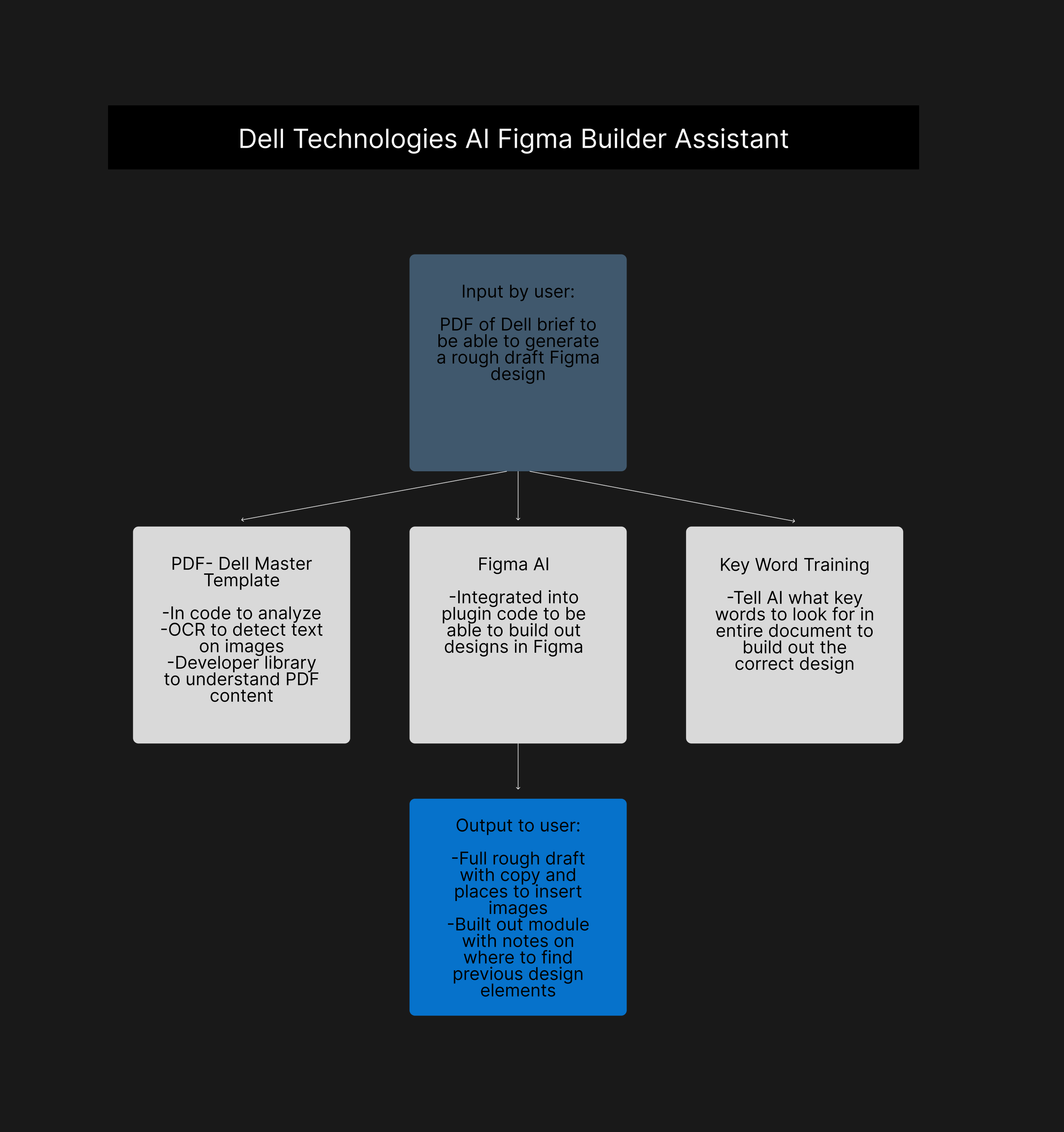
UX of Initial Idea
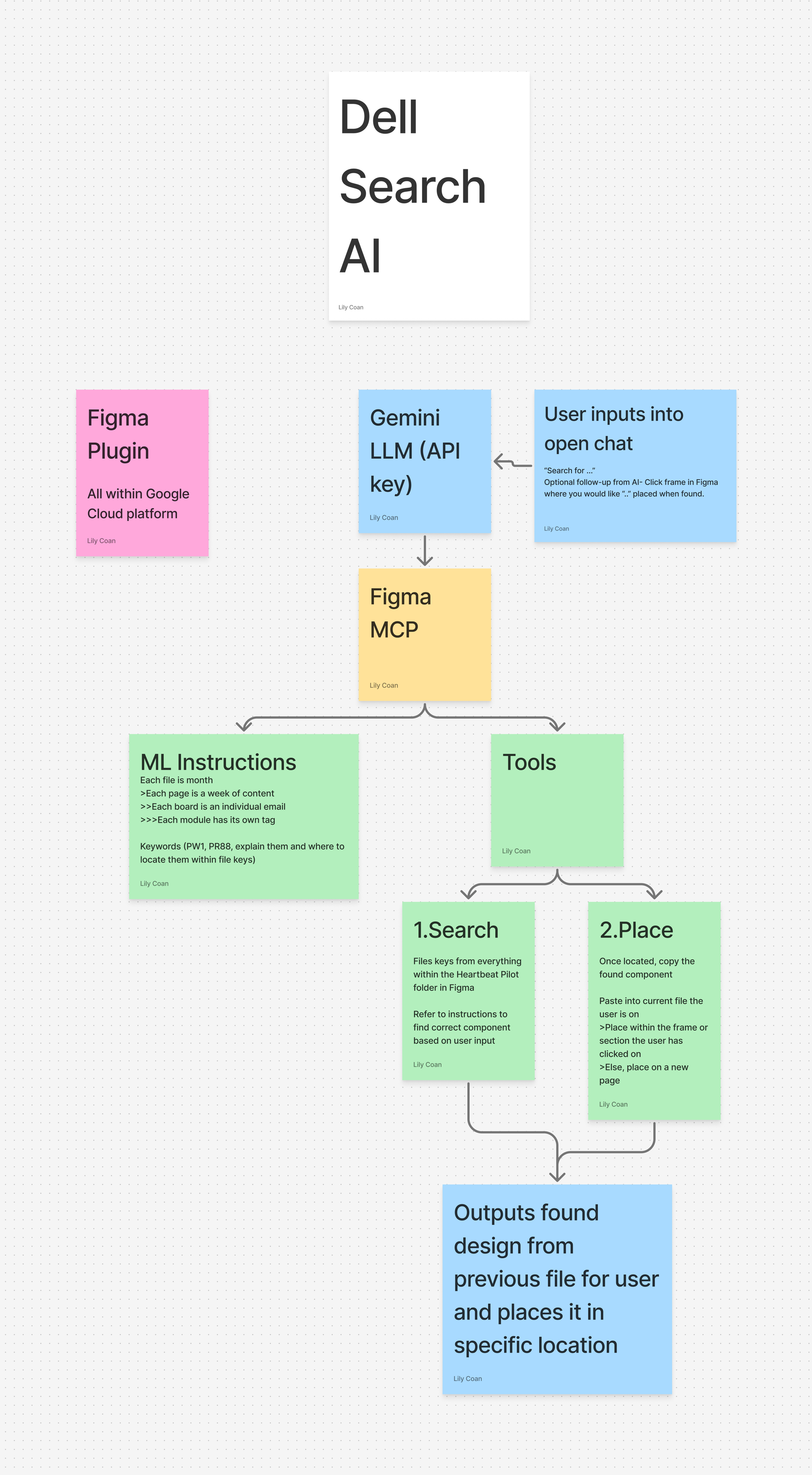
On the UX side, the goal was to eliminate friction and reduce cognitive load. Instead of forcing users to navigate complex systems, the interface was designed around simple, intuitive actions: search, select, and place. Early flows prioritized clarity, giving users visible control through structured results, clickable options, and predictable outcomes. This ensured that even with advanced AI working in the background, the experience remained transparent, fast, and easy to trust.
Defined system architecture connecting Figma plugin, LLM, and design file ecosystem
Translated unstructured inputs (PDFs, keywords, chat) into structured design actions
Designed a simplified UX flow: search → review options → place element
Prioritized real-time feedback and clear system responses for user trust
Reduced complexity by embedding all actions directly within the design environment
Established scalable logic for multi-file search, retrieval, and placement
The Design Process
The design process was driven by one goal: make something powerful feel effortless. I started by breaking down how designers currently navigate files, reuse components, and search for past work, highlighting inefficiencies and repeated behaviors.
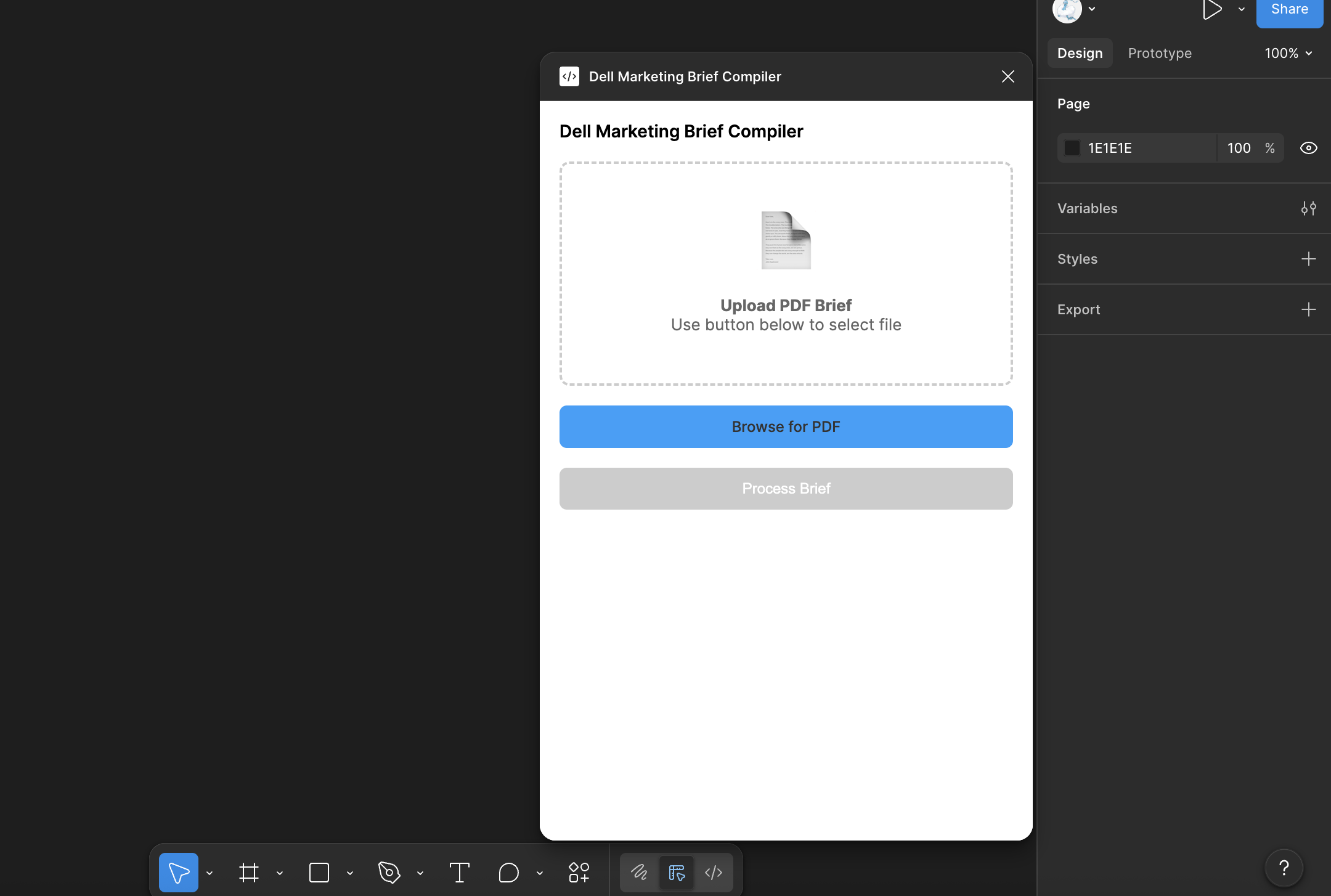
The design initially had users upload the entire brief for their design file and allow the AI to generate an entire rough drafted design with copy indicating where past artifacts were located.
However, this consumed too many tokens for the AI and caused many technical crashes or time delays in the designers’ work.
Phase 1
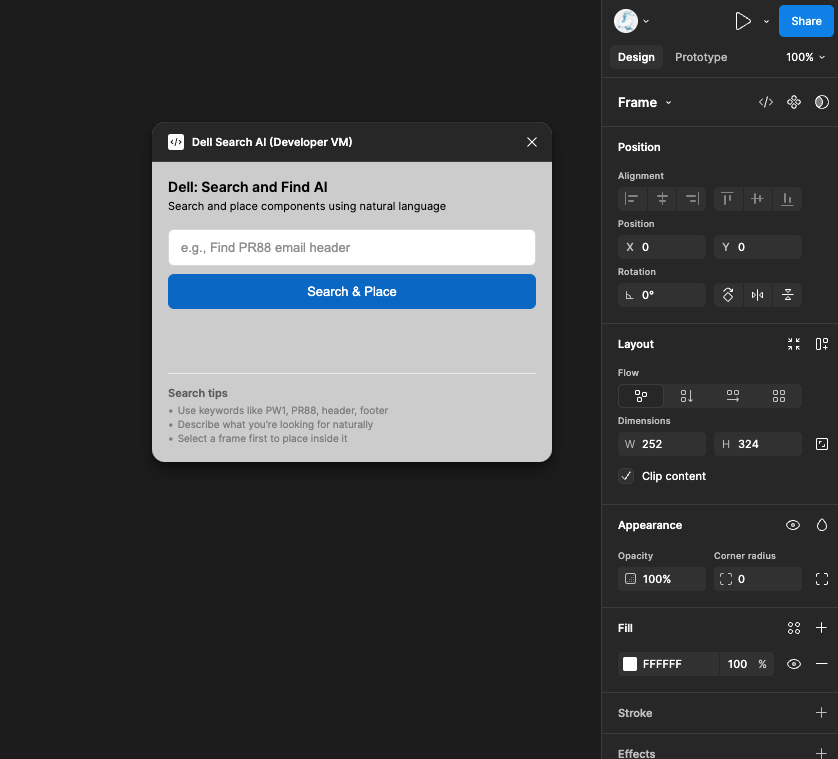
From there, I designed around a simple mental model: users shouldn’t have to think about where something lives, only what they’re looking for. This led to a streamlined flow where AI handles the complexity in the background, while the interface presents clear, actionable choices.
After holding multiple meetings with the design team, the main friction point for them was not generating designs from the brief, but rather trying to find old artifacts from previous design files to copy/paste and iterate. This is what caused them to lose the most time.
Phase 2
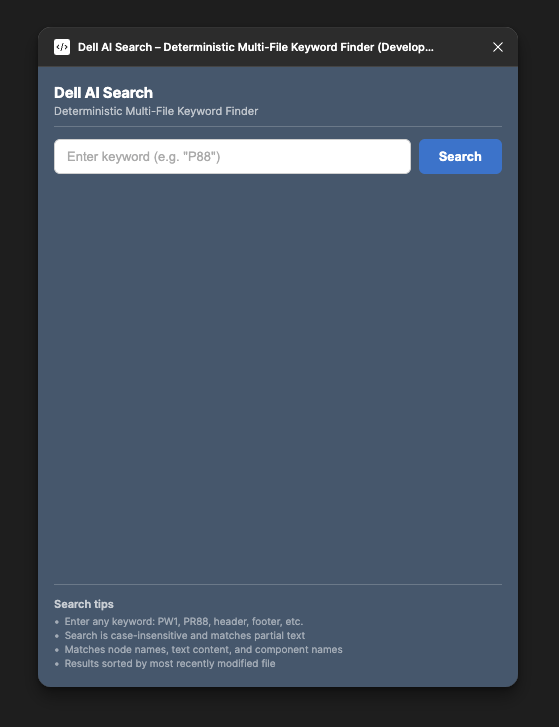
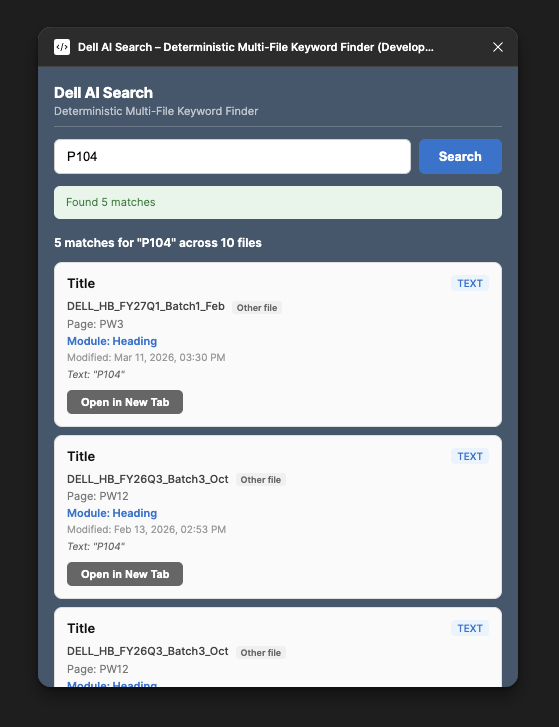
Through iteration, I refined how results are surfaced, how users move between options, and how placement feels immediate and predictable. Every decision prioritized reducing friction and keeping designers in their flow.
Mapped existing behaviors and inefficiencies
Designed around a “don’t make users think” principle
Simplified AI complexity into clear UI patterns
Iterated on result hierarchy and interaction clarity
Focused on maintaining flow within the design environment
Phase 3
The experience was designed around a simple, repeatable flow: search, review, and place. Instead of navigating across files, designers can query what they need and instantly see relevant results pulled from across the entire design system.
Results are structured and ranked by recency, giving users clear, actionable options. Each result acts as a direct entry point allowing designers to jump straight to the exact location of an element or place it directly into their current file.
Multi-file keyword search across entire design ecosystem
Results organized by file, page, and recency
Clickable options for quick navigation or direct use
Seamless flow from discovery to action
Core Experience
Interaction and System Design
The interaction model prioritizes clarity, speed, and trust. Every action has a predictable outcome, search returns structured results, selection reveals context, and placement happens instantly within the canvas.
Behind the scenes, recursive scanning and AI-powered keyword detection enable deep visibility across files, while the interface keeps that complexity hidden. Users are given control through clear options, without being overwhelmed by the underlying system.
Clear, predictable interaction patterns
AI-powered scanning without added user complexity
Direct placement into selected frames or pages
Real-time feedback to reinforce user confidence
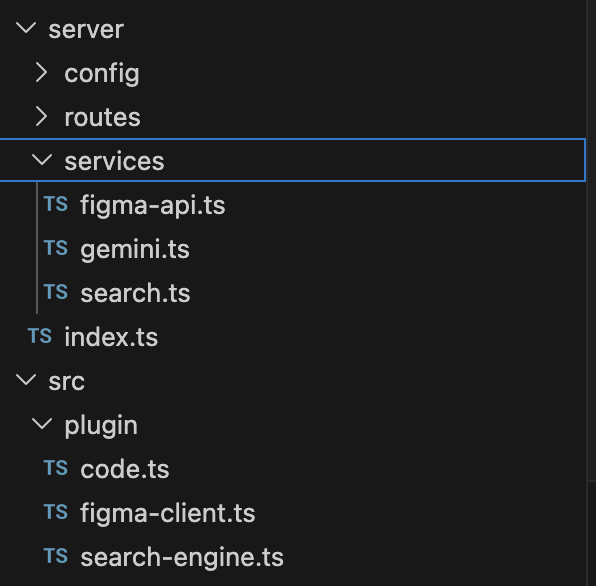
By eliminating manual searching and fragmented workflows, the tool significantly reduces time spent locating and recreating design assets. Designers can move faster, reuse existing work more effectively, and maintain greater consistency across files and teams.
This project reinforced the importance of designing AI-powered tools that feel intuitive and transparent. Rather than exposing complexity, the most effective solutions embed intelligence into familiar workflows, enhancing, not disrupting, how people already work.
Reduced time spent searching across files
Minimized duplicate design work
Improved consistency across teams and outputs
Streamlined workflows within a single environment
Reflection:
Balancing powerful AI capabilities with a simple UX was the biggest challenge. This experience strengthened my ability to translate complex systems into clear, usable products while maintaining speed, trust, and usability.